

Problem Statement
Organizations often have multiple Postgres databases, each connected to a different microservice. The goal is to logically replicate all of these databases into a single ParadeDB instance. This enables:- App-wide search across all microservices
- Cross-database joins for analytics and reporting
- Centralized data access without modifying individual microservices
Logical Replication Background
Postgres’ Logical Replication is designed from the perspective of one source database and one destination database. Logical replication resolves tables by their schema-qualified name. It does not have native primitives to remap schema or table names during replication.Solution
For logical replication to work, all source database tables need to have a unique signature that avoids name collisions. They also need to be identifiable by their source database. This can be achieved by using a different schema in each database instead of thepublic schema. The schema name should match the database name.
Architecture
The solution involves replicating multiple independent microservice databases into a single ParadeDB instance. Each source database uses a schema named after the database itself, ensuring no naming conflicts.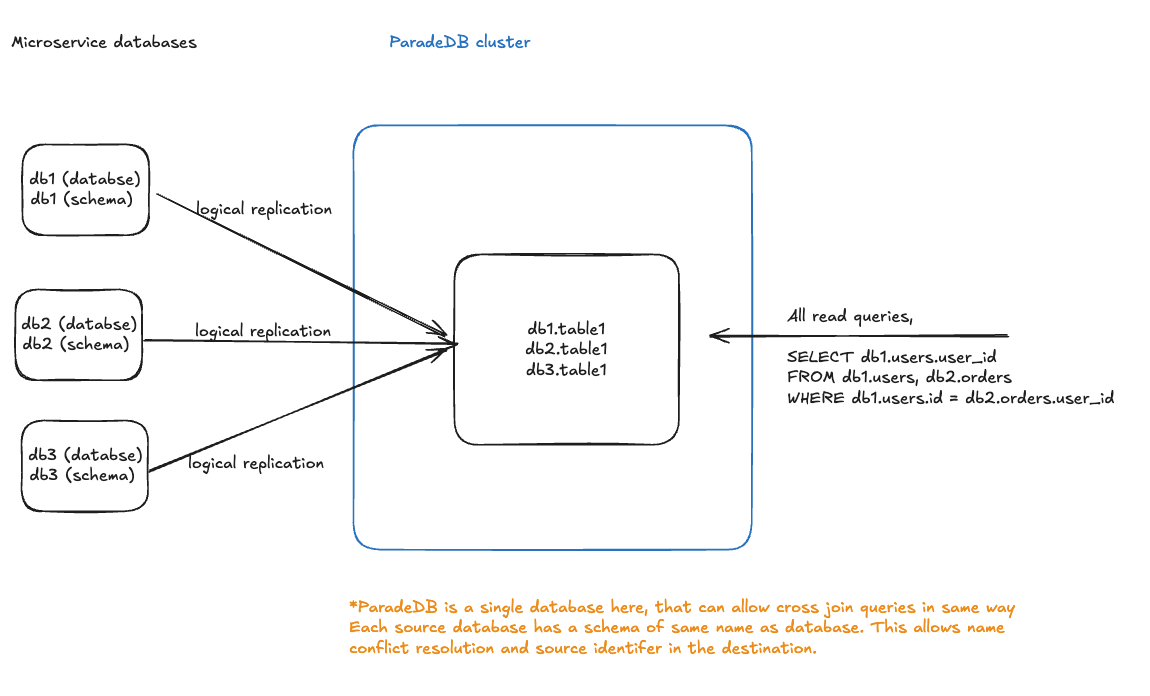
- Each microservice database (db1, db2, db3) uses a schema matching its database name
- All databases replicate to a single ParadeDB instance via logical replication
- In ParadeDB, tables are accessible with fully-qualified names (e.g.,
db1.table1,db2.table1) - This enables cross-database joins like:
SELECT db1.users.id, db2.orders.id FROM db1.users JOIN db2.orders ON db1.users.id = db2.orders.user_id
public schema across multiple databases:
Zero-Downtime Migration
This migration strategy reorganizes tables from thepublic schema into dedicated schemas while maintaining complete backwards compatibility through updatable views.
Migration Steps
For each microservice database, execute the following:Example
For ausers_service database:
Benefits of This Approach
- Zero Downtime: Existing applications continue to function without modification during the transition period for all queries (SELECT, INSERT, UPDATE, DELETE)
- Gradual Migration: Application queries can be updated over time to reference the new schema directly
- Rollback Capability: Each migration step is reversible if needed
- View Cleanup: Once applications are updated, views in the
publicschema can be safely removed
Setting Up Logical Replication
After completing the schema migration for all source databases:- Configure each source database as a publisher following the getting started guide
- Set up ParadeDB as a subscriber for all source databases
- Create publications on each source database for their respective schemas:
- Create subscriptions on ParadeDB for each source database:
Trade-offs
Pros
- Multi Database BM25 Search: Perform full-text search across tables distributed across multiple microservice databases in a single query
- Avoid Distributed Joins in Application: Execute cross-database joins directly in ParadeDB instead of implementing complex join logic in your application
- Simple Architecture: Uses standard Postgres logical replication without extra infrastructure
- Namespace Isolation: Schema-based separation prevents naming conflicts
- No Source Database Changes: Microservices continue operating independently; ParadeDB acts as a read replica
Cons
- Source databases will access tables from their dedicated schema (e.g.,
users_service) instead ofpublic - Requires coordination across microservice teams for initial migration
- Existing database tooling may need configuration updates to work with non-public schemas