> ## Documentation Index
> Fetch the complete documentation index at: https://docs.paradedb.com/llms.txt
> Use this file to discover all available pages before exploring further.
# Multi-Database Replication for Microservices
> Consolidate multiple microservice databases into a single ParadeDB instance for app-wide search and cross-database joins
## Problem Statement
Organizations often have multiple Postgres databases, each connected to a different microservice. The goal is to logically replicate all of these databases into a single ParadeDB instance. This enables:
* App-wide search across all microservices
* Cross-database joins for analytics and reporting
* Centralized data access without modifying individual microservices
However, table naming collisions can occur since each microservice and its database operate independently.
## Logical Replication Background
Postgres' Logical Replication is designed from the perspective of one source database and one destination database. Logical replication resolves tables by their schema-qualified name. It does not have native primitives to remap schema or table names during replication.
## Solution
For logical replication to work, all source database tables need to have a unique signature that avoids name collisions. They also need to be identifiable by their source database. This can be achieved by using a different schema in each database instead of the `public` schema. The schema name should match the database name.
### Architecture
The solution involves replicating multiple independent microservice databases into a single ParadeDB instance. Each source database uses a schema named after the database itself, ensuring no naming conflicts.
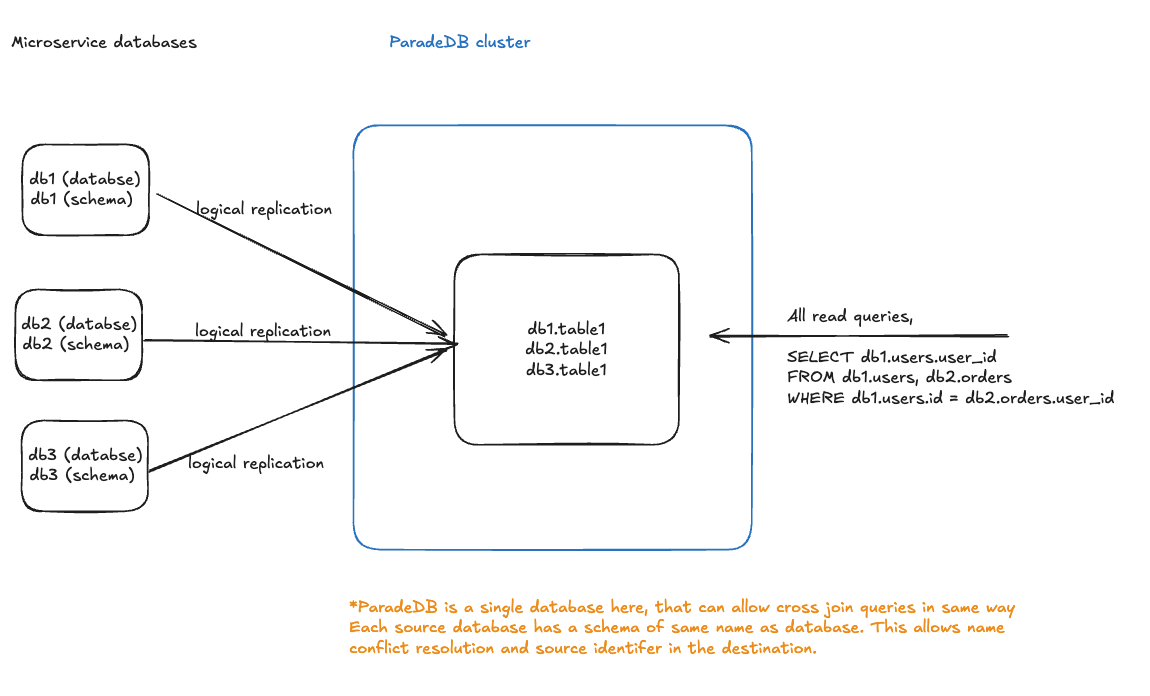 As shown in the diagram:
* Each microservice database (db1, db2, db3) uses a schema matching its database name
* All databases replicate to a single ParadeDB instance via logical replication
* In ParadeDB, tables are accessible with fully-qualified names (e.g., `db1.table1`, `db2.table1`)
* This enables cross-database joins like: `SELECT db1.users.id, db2.orders.id FROM db1.users JOIN db2.orders ON db1.users.id = db2.orders.user_id`
Instead of having all tables in the `public` schema across multiple databases:
```
Database: users_service
Schema: public
- users
- profiles
Database: orders_service
Schema: public
- orders
- payments
```
Reorganize each database to use a dedicated schema:
```
Database: users_service
Schema: users_service
- users
- profiles
Database: orders_service
Schema: orders_service
- orders
- payments
```
This approach ensures that when replicated to ParadeDB, all tables have unique fully-qualified names and you can identify the source of each table.
## Zero-Downtime Migration
This migration strategy reorganizes tables from the `public` schema into dedicated schemas while maintaining complete backwards compatibility through updatable views.
### Migration Steps
For each microservice database, execute the following:
```sql theme={null}
BEGIN;
-- Create new schema named after the database
CREATE SCHEMA IF NOT EXISTS ;
-- Move tables to new schema
ALTER TABLE public.table1 SET SCHEMA ;
ALTER TABLE public.table2 SET SCHEMA ;
-- Repeat for all tables...
-- Create backwards-compatible views in public schema
CREATE OR REPLACE VIEW public.table1 AS SELECT * FROM .table1;
CREATE OR REPLACE VIEW public.table2 AS SELECT * FROM .table2;
-- Repeat for all tables...
COMMIT;
```
### Example
For a `users_service` database:
```sql theme={null}
BEGIN;
-- Create new schema
CREATE SCHEMA IF NOT EXISTS users_service;
-- Move tables
ALTER TABLE public.users SET SCHEMA users_service;
ALTER TABLE public.profiles SET SCHEMA users_service;
-- Create backwards-compatible views
CREATE OR REPLACE VIEW public.users AS SELECT * FROM users_service.users;
CREATE OR REPLACE VIEW public.profiles AS SELECT * FROM users_service.profiles;
COMMIT;
```
### Benefits of This Approach
* **Zero Downtime**: Existing applications continue to function without modification during the transition period for all queries (SELECT, INSERT, UPDATE, DELETE)
* **Gradual Migration**: Application queries can be updated over time to reference the new schema directly
* **Rollback Capability**: Each migration step is reversible if needed
* **View Cleanup**: Once applications are updated, views in the `public` schema can be safely removed
### Setting Up Logical Replication
After completing the schema migration for all source databases:
1. Configure each source database as a publisher following the [getting started guide](/deploy/logical-replication/getting-started)
2. Set up ParadeDB as a subscriber for all source databases
3. Create publications on each source database for their respective schemas:
```sql theme={null}
-- On users_service database
CREATE PUBLICATION users_pub FOR TABLES IN SCHEMA users_service;
-- On orders_service database
CREATE PUBLICATION orders_pub FOR TABLES IN SCHEMA orders_service;
```
4. Create subscriptions on ParadeDB for each source database:
```sql theme={null}
-- On ParadeDB instance
CREATE SUBSCRIPTION users_sub
CONNECTION 'host=users_db port=5432 dbname=users_service user=replicator password=...'
PUBLICATION users_pub;
CREATE SUBSCRIPTION orders_sub
CONNECTION 'host=orders_db port=5432 dbname=orders_service user=replicator password=...'
PUBLICATION orders_pub;
```
## Trade-offs
### Pros
* **Multi Database BM25 Search**: Perform full-text search across tables distributed across multiple microservice databases in a single query
* **Avoid Distributed Joins in Application**: Execute cross-database joins directly in ParadeDB instead of implementing complex join logic in your application
* **Simple Architecture**: Uses standard PostgreSQL logical replication without extra infrastructure
* **Namespace Isolation**: Schema-based separation prevents naming conflicts
* **No Source Database Changes**: Microservices continue operating independently; ParadeDB acts as a read replica
### Cons
* Source databases will access tables from their dedicated schema (e.g., `users_service`) instead of `public`
* Requires coordination across microservice teams for initial migration
* Existing database tooling may need configuration updates to work with non-public schemas
As shown in the diagram:
* Each microservice database (db1, db2, db3) uses a schema matching its database name
* All databases replicate to a single ParadeDB instance via logical replication
* In ParadeDB, tables are accessible with fully-qualified names (e.g., `db1.table1`, `db2.table1`)
* This enables cross-database joins like: `SELECT db1.users.id, db2.orders.id FROM db1.users JOIN db2.orders ON db1.users.id = db2.orders.user_id`
Instead of having all tables in the `public` schema across multiple databases:
```
Database: users_service
Schema: public
- users
- profiles
Database: orders_service
Schema: public
- orders
- payments
```
Reorganize each database to use a dedicated schema:
```
Database: users_service
Schema: users_service
- users
- profiles
Database: orders_service
Schema: orders_service
- orders
- payments
```
This approach ensures that when replicated to ParadeDB, all tables have unique fully-qualified names and you can identify the source of each table.
## Zero-Downtime Migration
This migration strategy reorganizes tables from the `public` schema into dedicated schemas while maintaining complete backwards compatibility through updatable views.
### Migration Steps
For each microservice database, execute the following:
```sql theme={null}
BEGIN;
-- Create new schema named after the database
CREATE SCHEMA IF NOT EXISTS ;
-- Move tables to new schema
ALTER TABLE public.table1 SET SCHEMA ;
ALTER TABLE public.table2 SET SCHEMA ;
-- Repeat for all tables...
-- Create backwards-compatible views in public schema
CREATE OR REPLACE VIEW public.table1 AS SELECT * FROM .table1;
CREATE OR REPLACE VIEW public.table2 AS SELECT * FROM .table2;
-- Repeat for all tables...
COMMIT;
```
### Example
For a `users_service` database:
```sql theme={null}
BEGIN;
-- Create new schema
CREATE SCHEMA IF NOT EXISTS users_service;
-- Move tables
ALTER TABLE public.users SET SCHEMA users_service;
ALTER TABLE public.profiles SET SCHEMA users_service;
-- Create backwards-compatible views
CREATE OR REPLACE VIEW public.users AS SELECT * FROM users_service.users;
CREATE OR REPLACE VIEW public.profiles AS SELECT * FROM users_service.profiles;
COMMIT;
```
### Benefits of This Approach
* **Zero Downtime**: Existing applications continue to function without modification during the transition period for all queries (SELECT, INSERT, UPDATE, DELETE)
* **Gradual Migration**: Application queries can be updated over time to reference the new schema directly
* **Rollback Capability**: Each migration step is reversible if needed
* **View Cleanup**: Once applications are updated, views in the `public` schema can be safely removed
### Setting Up Logical Replication
After completing the schema migration for all source databases:
1. Configure each source database as a publisher following the [getting started guide](/deploy/logical-replication/getting-started)
2. Set up ParadeDB as a subscriber for all source databases
3. Create publications on each source database for their respective schemas:
```sql theme={null}
-- On users_service database
CREATE PUBLICATION users_pub FOR TABLES IN SCHEMA users_service;
-- On orders_service database
CREATE PUBLICATION orders_pub FOR TABLES IN SCHEMA orders_service;
```
4. Create subscriptions on ParadeDB for each source database:
```sql theme={null}
-- On ParadeDB instance
CREATE SUBSCRIPTION users_sub
CONNECTION 'host=users_db port=5432 dbname=users_service user=replicator password=...'
PUBLICATION users_pub;
CREATE SUBSCRIPTION orders_sub
CONNECTION 'host=orders_db port=5432 dbname=orders_service user=replicator password=...'
PUBLICATION orders_pub;
```
## Trade-offs
### Pros
* **Multi Database BM25 Search**: Perform full-text search across tables distributed across multiple microservice databases in a single query
* **Avoid Distributed Joins in Application**: Execute cross-database joins directly in ParadeDB instead of implementing complex join logic in your application
* **Simple Architecture**: Uses standard PostgreSQL logical replication without extra infrastructure
* **Namespace Isolation**: Schema-based separation prevents naming conflicts
* **No Source Database Changes**: Microservices continue operating independently; ParadeDB acts as a read replica
### Cons
* Source databases will access tables from their dedicated schema (e.g., `users_service`) instead of `public`
* Requires coordination across microservice teams for initial migration
* Existing database tooling may need configuration updates to work with non-public schemas